Knowledge base
The Knowledge base tab allows you to provide documents and free-form text for the current session. The AI analyses the content and automatically organises the information into structured knowledge that can be used throughout your drafting and editing tasks.
The AI identifies and categorises several types of information:
- Entities: products, components, systems, organizations, roles, and other identified entities
- Concepts: concepts, principles, capabilities, architectures, and operating models
- Facts: technical specifications, properties, values, measurements, constraints, and other verifiable information
- Procedures: usage, installation, maintenance, servicing, and other procedural instructions
- Requirements: functional, technical, safety, and operational requirements
- Risks: identified hazards, impacts, risk factors, and mitigation measures
- Terms: key terms, definitions, abbreviations, and their explanations
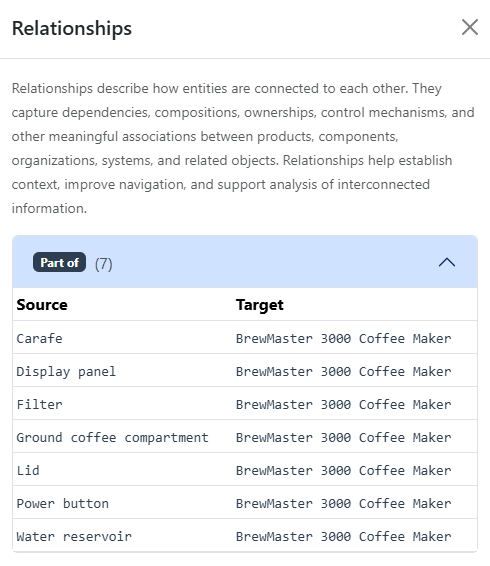
- Relationships: connections and dependencies between entities, concepts, and other knowledge elements
This structured knowledge helps the AI better understand the provided material, answer questions more accurately, and use relevant information consistently throughout the session.
Note
The AI uses knowledge for the current session. It does not store, retain, or reuse this information in future sessions. Download the knowledge base for possible future use.
How to use the knowledge base
You can use the Knowledge base tab to:
- Upload source documents for analysis.
- Provide free-form reference material.
- Build a structured knowledge model for the current session.
- Explore extracted entities, facts, requirements, procedures, and other knowledge elements.
Adding knowledge
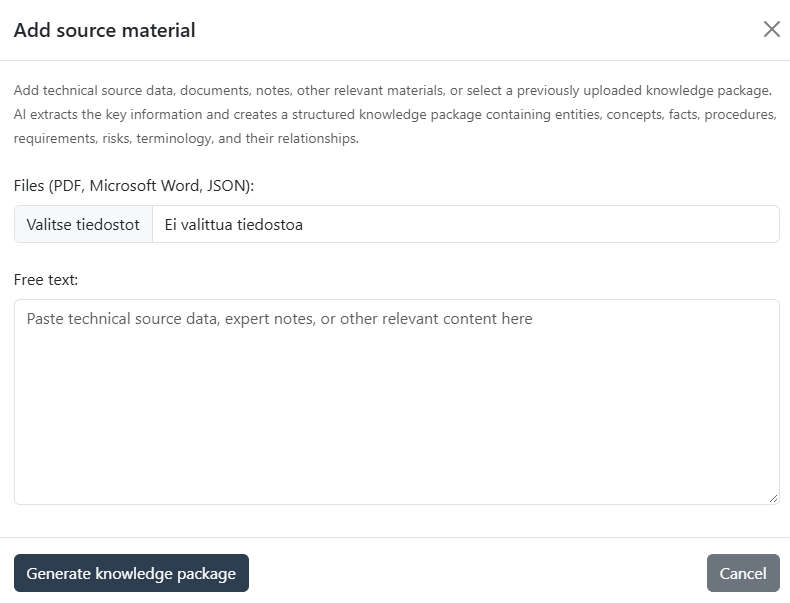
To add source material, follow these steps:
- Click the plus button.
- Select the files to be analysed, or paste free-form reference text.
- Click "Generate knowledge package" to start the analysis.
Note
Supported source materials include Microsoft Word documents (DOCX), PDF files, and free-form text entered directly in the form.
You can also submit an earlier downloaded knowledge base in JSON format.
During the analysis, the AI identifies structured information that it can then use. Click "View" for each section to see details under that category.
Note
The knowledge base is session-specific. Information added to the knowledge base is available only during the current session and is not retained for future sessions. Download the knowledge base for later use.
Downloading
The contents of the knowledge base are not stored permanently. You can download the knowledge base in JSON format for later use as follows:
- Click the Download button.
- Save the file to your desired location.
Deleting
You can delete a previously created or imported knowledge as follows:
- Click the Trash icon.
- Select Clear also the knowledge base.
Warning
Deleting the knowledge base will also remove the draft and the conversation history. This action cannot be undone.
Example
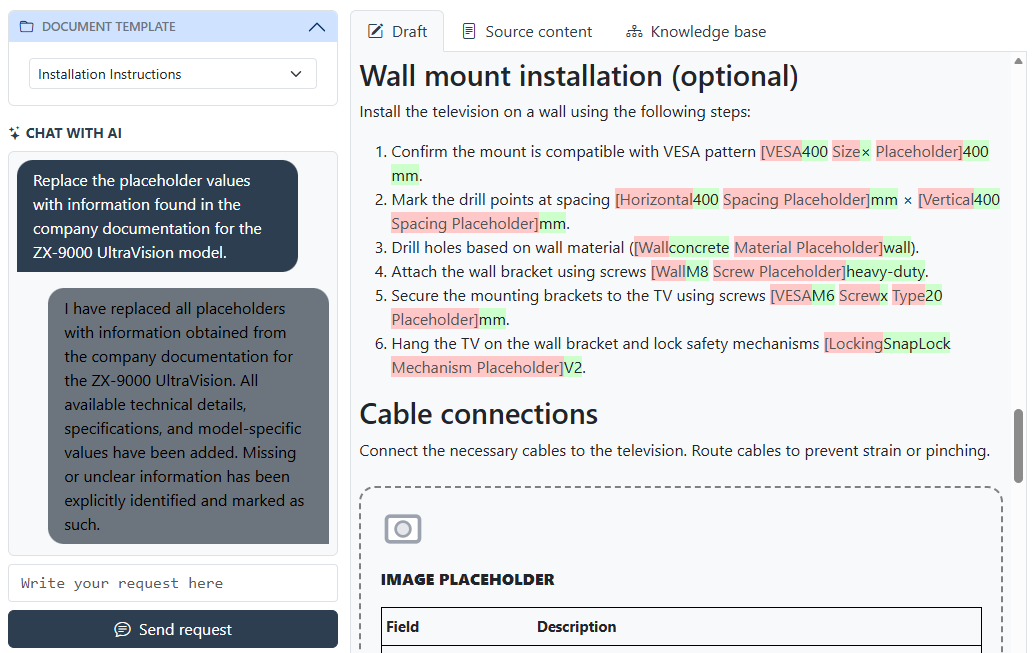
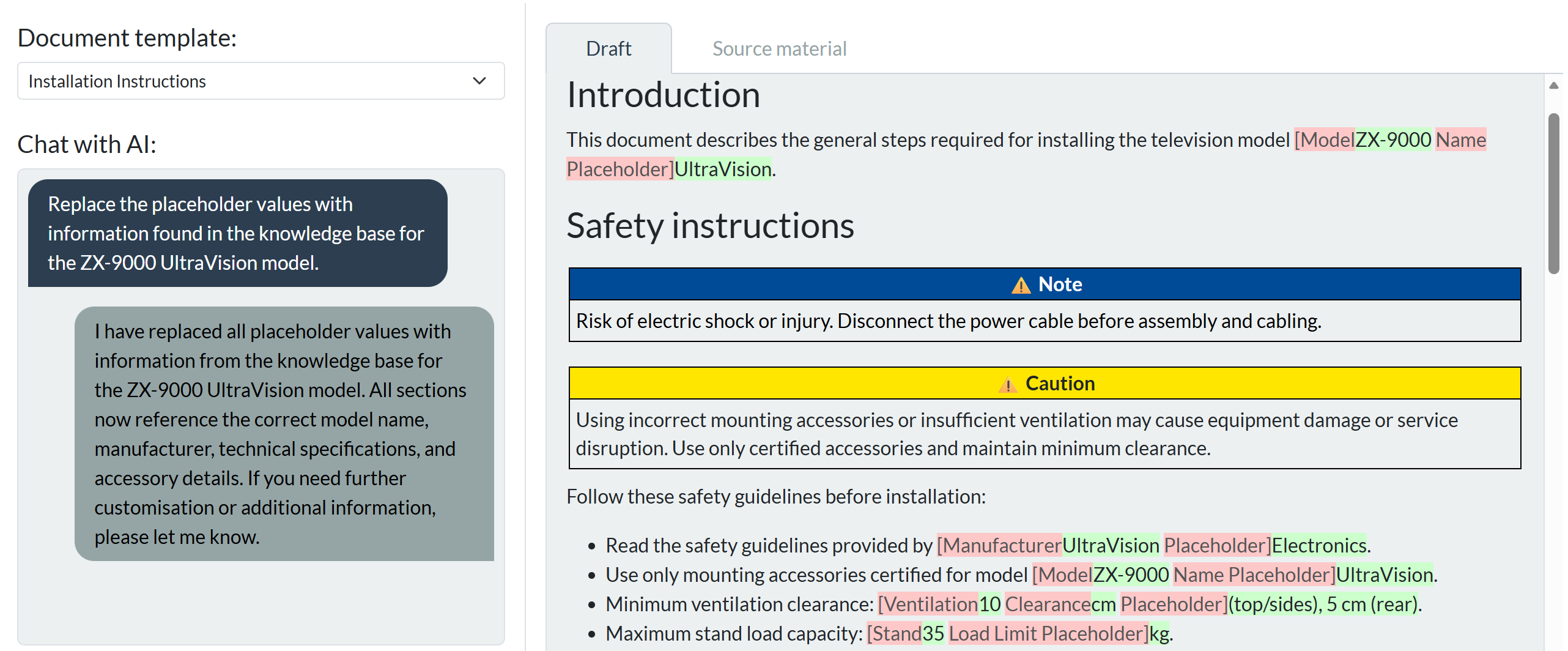
The following example demonstrates how the knowledge base can be used as source material when creating documentation for a similar product.
- Sample user query: Draft an initial draft for product ZX-9500 UltraVision based on the product ZX-9000 UltraVision.
Company documentation
In addition to the session knowledge base, the application maintains a separate company documentation containing approved reference documents. The AI can search this document set when additional information or supporting material is required. These documents provide organisation-wide reference material that can be used across discussions and drafting tasks.
The application support team can help you set up and manage the company documentation.
Example
The following example demonstrates how the AI can retrieve additional information from the company documentation when relevant information is not available in the current session materials.
- Sample user query: Replace the placeholder values with information found in the company documentation for the ZX-9000 UltraVision model.